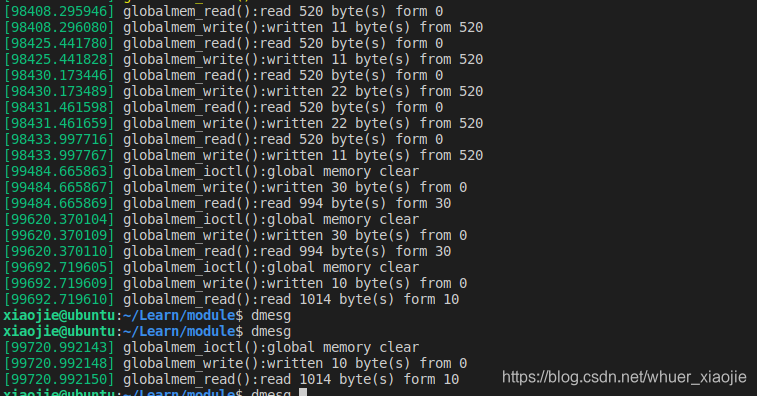
在Linux内核里面,设备(device)主要分为 通过以下命令加载和查看驱动 用户空间测试代码如下: 使用以下命令测试: Debug message 如下:
字符设备,块设备,网络设备,字符设备驱动是Linux驱动基础,在看《Linux 设备驱动开发详解》这本书的过程中,把字符设备相知识记录整理如下。字符设备驱动的组成
字符设备驱动模块加载和卸载函数
//设备结构体 struct xxx_dev_t{ struct cdev cdev; //...... }xxx_dev; static struct xxx_dev *xxx_dev; const struct file_operations xxx_fops = { .owner = THIS_MODULE, .read = xxx_read, .write = xxx_write, //...... } stattic int __init xxx_init(void) { //...... cdev_init(&xxx_dev->cdev, &xxx_fops); xxx_dev->cdev.owner = THIS_MODULE; //获取字符设备号 alloc_chrdev_region(&xxx_dev_no, 0, DEVICE_COUNT, DEVICE_NAME); //注册设备 ret = cdev_add(&xxx_dev->cdev, xxx_dev_no, 1); //...... } static void __exit xxx_exit(void) { //注销设备 cdev_del(&xxx_dev->cdev); //注销设备号 unregister_chrdev_region(xxx_dev_no,1); //...... } 字符驱动操作成员函数
static int xxx_open(struct inode *inode, struct file *filp) { //...... return 0; } static int xxx_release(struct inode *inode, struct file *filp) { //...... return 0; } static long xxx_ioctl(struct file *filp, unsigned int cmd, unsigned long arg) { //... switch (cmd) { case xxx_cmd1: //...... break; default: return -EINVAL; } return 0; } static ssize_t xxx_read(struct file *filp, char __user *buf, size_t size, loff_t *ppos) { //... copy_to_user(buf, xxx, count); //... return count; } static ssize_t xxx_write(struct file *filp, const char __user *buf, size_t size, loff_t *ppos) { //... copy_from_user(xxx, buf, count); //... return count; } static loff_t globalmem_llseek(struct file *filp, loff_t offset, int orig) { //...... switch (orig) { case 0:/*SEEK_SET Seek from beginning of file*/ //...... filp->f_pos = (unsigned int)offset; ret = filp->f_pos; break; case 1: /*SEEK_CUR Seek from current position*/ //...... filp->f_pos += offset; ret = filp->f_pos; break; case 2:/* SEEK_END Seek from end of file */ //...... filp->f_pos -= offset; ret = filp->f_pos; break; default: ret = -EFAULT; break; } return ret; } DEMO测试
$: make $: sudo demsg -c $: sudo insmod multi_globalmem.ko $: lsmod $: sudo mknod /dev/globalmem c 230 0 //创建设备节点 $: sudo dmesg #include <fcntl.h> #include <stdio.h> #include <stdlib.h> #include <unistd.h> #define DEVICE_NAME "/dev/globalmem" #define MAX_SIZE 1020 #define MEM_CLEAR 0x01 static void usage(char *name) { fprintf(stderr, "Usage:%s [message]n", name); } int main(int argc, char **argv) { if (argc != 2) { usage(argv[0]); return -1; } char *msg = argv[1]; char buf[MAX_SIZE]; //open the file int fd = open(DEVICE_NAME, O_RDWR); if (fd < 0) { fprintf(stderr, "open %s failedn", DEVICE_NAME); return -1; } //clear the file if (ioctl(fd, 1, 0) < 0) { fprintf(stderr, "clear %s filedn", DEVICE_NAME); close(fd); return -1; } //write message to file if (write(fd, msg, strlen(msg)) <= 0) { fprintf(stderr, "write %s errorn", DEVICE_NAME); } if (lseek(fd, -strlen(msg), SEEK_CUR) < 0) { fprintf(stderr, "seek %s errorn", DEVICE_NAME); } //read from file if (read(fd, buf, MAX_SIZE) <= 0) { fprintf(stderr, "read %s failed!n", DEVICE_NAME); } else { fprintf(stderr, "read suceess: buf=%sn", buf); } close(fd); return 0; } $: gcc test_globalmem.c -o test_globalmem $: sudo ./test_globalmem message
本网页所有视频内容由 imoviebox边看边下-网页视频下载, iurlBox网页地址收藏管理器 下载并得到。
ImovieBox网页视频下载器 下载地址: ImovieBox网页视频下载器-最新版本下载
本文章由: imapbox邮箱云存储,邮箱网盘,ImageBox 图片批量下载器,网页图片批量下载专家,网页图片批量下载器,获取到文章图片,imoviebox网页视频批量下载器,下载视频内容,为您提供.
阅读和此文章类似的: 全球云计算
 官方软件产品操作指南 (170)


