layout StreamUtility(把流写在文件上) Mainactivity.java 1.线程之间通讯构建第三方,利用handler传给主线程再更新ui 最后在androidmanifest加上网络权限
从网页获取图片
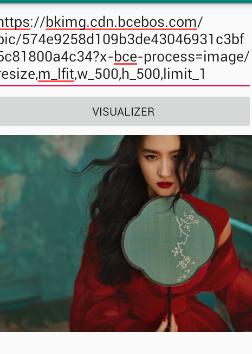
效果是这样,下面是代码:
<?xml version="1.0" encoding="utf-8"?> <LinearLayout xmlns:android="https://schemas.android.com/apk/res/android" android:orientation="vertical" android:layout_width="match_parent" android:layout_height="match_parent" > <EditText android:layout_width="match_parent" android:layout_height="wrap_content" android:id="@+id/et_target" android:text="https://bkimg.cdn.bcebos.com/pic/574e9258d109b3de43046931c3bf6c81800a4c34?x-bce-process=image/resize,m_lfit,w_500,h_500,limit_1" /> <Button android:layout_width="match_parent" android:layout_height="wrap_content" android:text="visualizer" android:onClick="visualizer"/> <ImageView android:layout_width="wrap_content" android:layout_height="wrap_content" android:id="@+id/iv_result" /> </LinearLayout> public class StreamUtility { public static void writeStream2File (InputStream in, File file) throws Exception { FileOutputStream outputStream = new FileOutputStream(file); int len= -1; byte[] buffer = new byte[1024]; while ((len= in.read(buffer)) !=-1){ outputStream.write(buffer,0,len); } outputStream.close(); in.close(); } } 因为子线程不能更新ui,这里有两种方法
2.用runonUIThread方法,直接在子线程更新uipublic class MainActivity extends AppCompatActivity { private EditText et_target; private ImageView iv_result; private Handler handler =new Handler(){ @Override public void handleMessage( Message msg) { switch (msg.what){ case RESPONSE_SUCCESS: Bitmap result = (Bitmap) msg.obj; iv_result.setImageBitmap(result); break; case RESPONSE_FAILED: Toast.makeText(MainActivity.this, "失败"+msg.arg1, Toast.LENGTH_SHORT).show(); break; case RESPONSE_EXCEPTION: Toast.makeText(MainActivity.this, "异常", Toast.LENGTH_SHORT).show(); break; } } }; private final int RESPONSE_SUCCESS=1; private final int RESPONSE_FAILED=2; private final int RESPONSE_EXCEPTION=3; @Override protected void onCreate(Bundle savedInstanceState) { super.onCreate(savedInstanceState); setContentView(R.layout.activity_main); et_target = (EditText) findViewById(R.id.et_target); iv_result = (ImageView) findViewById(R.id.iv_result); } public void visualizer(View view) { final String path = et_target.getText().toString().trim(); final File file = new File(getCacheDir(), Base64.encodeToString(path.getBytes(),Base64.DEFAULT));/*缓存cache*//*现在没产生文件,写名,开流时候才产生*/ /*base64应用原因 1.转换成的字符串没有特殊字符2.加密好的也是唯一的,不能重复3.加密后的固定长度*/ if (file.exists() && file.length()>0){ Bitmap bitmap = BitmapFactory.decodeFile(file.getAbsolutePath()); iv_result.setImageBitmap(bitmap); System.out.println("-----------------cache"); return; } new Thread(){ @Override public void run() { HttpURLConnection connection = null; try { URL url = new URL(path); connection = (HttpURLConnection) url.openConnection(); connection.setRequestMethod("GET"); connection.setConnectTimeout(5000); int code = connection.getResponseCode(); if (code == 200){ InputStream inputStream = connection.getInputStream(); StreamUtility.writeStream2File(inputStream,file);/*把流写入file文件上*/ /*Message message = new Message();*//*new是最慢的*/ final Bitmap bitmap = BitmapFactory.decodeFile(file.getAbsolutePath());/*从本地拿,绝对路径*/ System.out.println("-----------------newload"); runOnUiThread(new Runnable() { @Override public void run() { iv_result.setImageBitmap(bitmap); } }); /*如果只更新ui用runOnUiThread,如果给主线程发数据只能用handler*/ /*iv_result.setImageBitmap(BitmapFactory.decodeStream(inputStream));*//*位图,容易崩溃*/ }else { Message msg = Message.obtain(); msg.arg1=code; msg.what=RESPONSE_FAILED; handler.sendMessage(msg); } } catch (Exception e) { handler.sendEmptyMessage(RESPONSE_EXCEPTION); e.printStackTrace(); } finally { if (connection != null) connection.disconnect(); } } }.start(); } } <uses-permission android:name="android.permission.INTERNET"/>
本网页所有视频内容由 imoviebox边看边下-网页视频下载, iurlBox网页地址收藏管理器 下载并得到。
ImovieBox网页视频下载器 下载地址: ImovieBox网页视频下载器-最新版本下载
本文章由: imapbox邮箱云存储,邮箱网盘,ImageBox 图片批量下载器,网页图片批量下载专家,网页图片批量下载器,获取到文章图片,imoviebox网页视频批量下载器,下载视频内容,为您提供.
阅读和此文章类似的: 全球云计算
 官方软件产品操作指南 (170)


