写本文的原因是网上对于吃豆人的教程已经有很多了,但是我发现所有的教程,怪物的移动算法都是自定义的路径,或者是随机选几个自己设置好的路径中的一个巡逻,本文深入研究如何通过BFS广度(宽度)优先算法,接下来还会写A*算法,来实现怪物的巡逻AI,实现真正意义的AI寻路,一起加油吧! 首先,简单介绍一下游戏,游戏就是一个玩家控制的主角在地图中走动,躲避怪物的追踪,吃场景中的豆子的游戏,如下图,本文介绍的就是如何写游戏中的怪物移动脚本,让怪物可以通过BFS广度(宽度)优先算法追踪主角,增大游戏的难度,其他的制作网上已经有很多的教程了,但是没有真正意义的AI巡逻,所以本文解决BFS算法巡逻,好了,前文说完了,进入正题吧—— 一般情况下,游戏的地图如下,可以看到有障碍物,就是墙,然后豆子存在的地方就是玩家和怪物真正能行走的地方,我们注意本文中,所有的豆子坐标都是整数数组,地图也是标准的32*32,我们需要的就是让怪物每次走的路都是计算后在可走路径中的最短路径,这样就会有追踪的感觉 广度优先搜索算法(英语:Breadth-First Search,缩写为BFS),又译作宽度优先搜索,或横向优先搜索,是一种图形搜索算法。简单的说,BFS是从根节点开始,沿着树的宽度遍历树的节点。如果所有节点均被访问,则算法中止。 在本游戏中,我们要做的是从怪物所在点为起点,玩家所在点为终点,计算最短路径,使用BFS算法,就是先从初始点开始,判断初始点四周的点是不是目标点,不是的话,从初始点四周的点开始重复判断周围,直到找到终点,返回路径。 这里我们使用队列Queue,动态数组List,字典Dictionary 1将初始点放入队列 讲解1 public Dictionary<Vector2Int, WayPoint> wayPointDict 此脚本有两个属性 讲解2 ClearPath()方法 怪物移动的代码如下,难点讲解随后 1 wayPoints List中保存我们的怪物下次要走的路径 到这里就应该结束了,如果大家遇到什么问题,可以问我哈,如果看到这里,给博主点个赞,是对博主最大的鼓励了,一起加油吧
文章目录
红色为BFS怪物
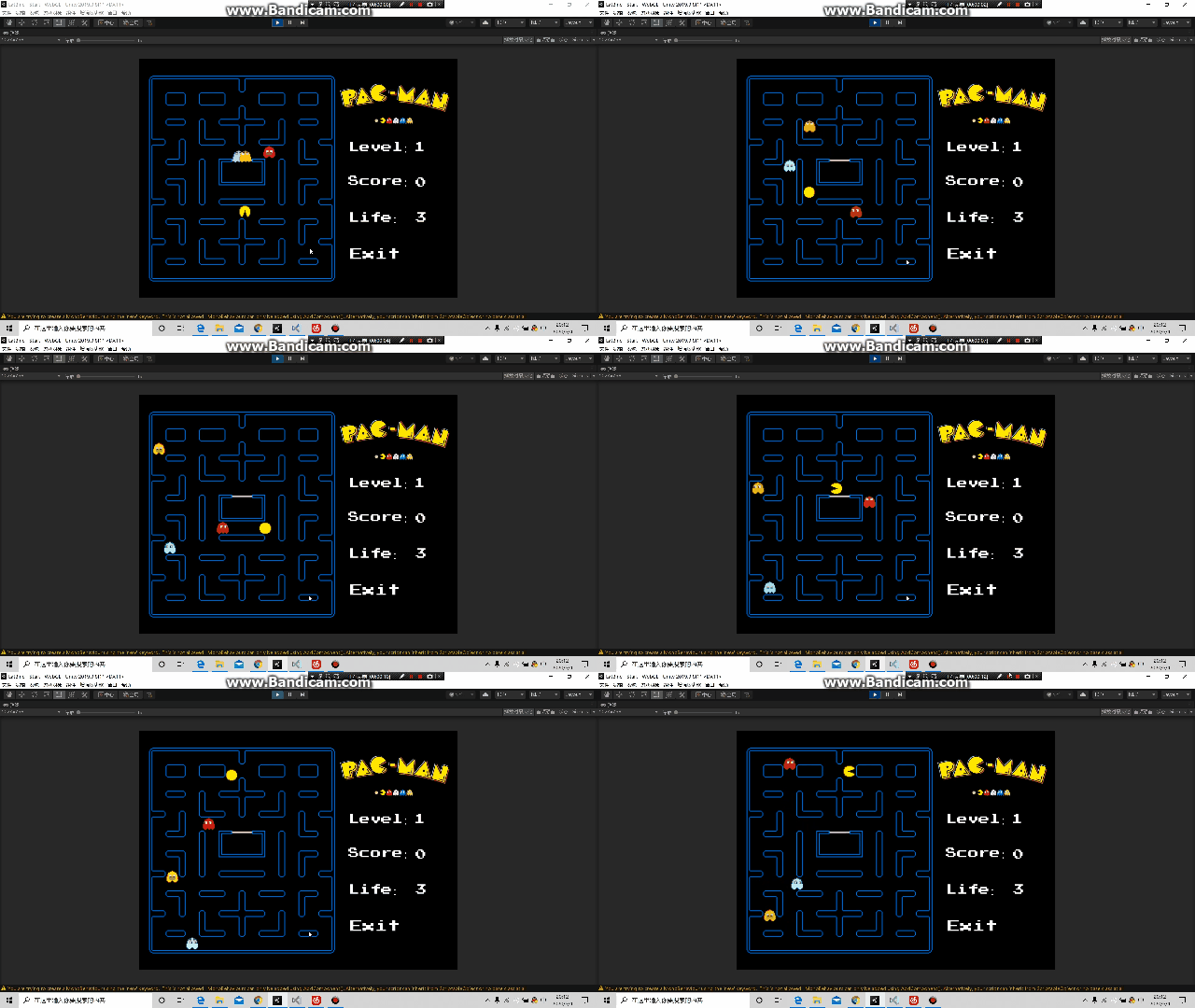
Unity吃豆人敌人BFS宽度优先实现怪物追踪玩家寻路

写在前面
游戏简单介绍

地图讲解

我们需要创建一个所有路径空物体,下面存放所有的路径点,如下

路径坐标如下

BFS广度(宽度)优先算法详解(最重要)
总体介绍
本游戏中使用思想
使用的数据结构
队列Queue:存放需要检验的点
动态数组List:存放找到后的反向路径,最后使用List的Reverse()方法倒转得到路径
字典Dictionary:以坐标为键,以游戏中的路径GameObject为值,存放对应关系算法的伪代码实现
while(队列是否为空)
{
将队列第一个值V移出队列;
if(V是终点)
{
结束算法
}
else
{
将V的四周的值加入队列(这样队列就不会为空,下次循环就会从加入的值开始计算,会一层一层来)
}
移出的值,搜索过的设置为【已经搜索状态】,防止重复计算
}算法的具体实现(看不懂没关系,后面会挑出来难的讲解)
using System.Collections; using System.Collections.Generic; using UnityEngine; public class BFSPath : MonoBehaviour { [SerializeField] public GameObject startPoint, endPoint; public int a; //(讲解1) public Dictionary<Vector2Int, WayPoint> wayPointDict = new Dictionary<Vector2Int, WayPoint>();//通过字典保存游戏内所有的瓦片,通过Vector2Int查找对应的GameObject private Vector2Int[] directions = { Vector2Int.up, Vector2Int.right, Vector2Int.down, Vector2Int.left };//每一个瓦片四周都有各自的其他瓦片 public Queue<WayPoint> queue = new Queue<WayPoint>(); [SerializeField] private bool isRunning = true; [SerializeField] private WayPoint searchCenter; public List<WayPoint> path = new List<WayPoint>();//CORE 我们敌人真正计算过后的最佳路径 //private void Start() //{ // startPoint.GetComponent<MeshRenderer>().material.color = Color.blue; // endPoint.GetComponent<MeshRenderer>().material.color = Color.red; // LoadAllWayPoints(); // //ExploreAround();MARKER 这个方法将会在BFS方法体内被调用 // BFS(); // CreatePath(); //} public List<WayPoint> GetPath() { ClearPath(); isRunning = true; queue.Clear(); path.Clear(); wayPointDict.Clear(); LoadAllWayPoints(); BFS(); CreatePath(); return path; } //(讲解2) public void ClearPath() { var wayPointss = FindObjectsOfType<WayPoint>(); foreach (WayPoint wayPoint in wayPointss) { wayPoint.exploredFrom = null; wayPoint.isExplored = false; } } //修改这个ExploreAround方 //因为当前的方法只能去计算【startPoint】相邻的四个瓦片 //通过这个方法计算所有的/searchCenter点的 MARKER 相邻的瓦片 //由于声明了searchCenter的关系,这里可以直接使用searchCenter,去除原先的参数 //(讲解3) private void ExploreAround() { if (isRunning == false) return; foreach (Vector2Int direction in directions) { //Debug.Log(direction);//我们先优先检测下directions里的值~ //Debug.Log("Exploring: " + startPoint.GetComponent<WayPoint>().GetPosition() + direction);//先检测康康有没有问题 var exploreArounds = searchCenter.GetPosition() + direction; //四周的相邻瓦片【变色】 //MARKER 处理边缘的解决方法 //1.判断字典中是否没有这个Key //2.通过try catch try { var neighbour = wayPointDict[exploreArounds]; if (neighbour.isExplored || queue.Contains(neighbour))//如果这个瓦片已被搜索,防止重复运行 { //啥也别干 } else//MARKER 只有当这个瓦片还尚未被搜索时 { //neighbour.GetComponent<MeshRenderer>().material.color = Color.green; queue.Enqueue(neighbour);//将搜索的相邻的瓦片,也存储在Queue中 // Debug.Log("Exploring: " + exploreArounds); neighbour.exploredFrom = searchCenter;//将相邻搜索到的瓦片,它们的“出处”,存储searchCenter,表示每个瓦片到底是由哪个之前的瓦片所得来的 } } catch { //这里什么都不写 //Debug.LogWarning(exploreArounds + " Not Exist"); } } } //MARKER 先把场景中所有的瓦片,存放在字典wayPointDict中,在游戏一开始时 private void LoadAllWayPoints() { var wayPoints = FindObjectsOfType<WayPoint>(); foreach (WayPoint wayPoint in wayPoints) { var tempWayPoint = wayPoint.GetPosition(); if (wayPointDict.ContainsKey(tempWayPoint)) { // Debug.Log("Skip overlap block " + wayPoint); } else { wayPointDict.Add(tempWayPoint, wayPoint); //Debug.LogError(tempWayPoint); } } } private void BFS() { queue.Enqueue(startPoint.GetComponent<WayPoint>()); while (queue.Count > 0 && isRunning) { searchCenter = queue.Dequeue();//一开始就是从StartPoint开始搜索 // Debug.Log("Search From: " + searchCenter.GetPosition()); StopIfSearchEnd(); ExploreAround(); searchCenter.isExplored = true;//标记为已搜索,防止重复运行 } //Debug.Log("Finished???????"); } private void StopIfSearchEnd() { if (searchCenter == endPoint.GetComponent<WayPoint>())//如果我们一直搜索之后,搜索中心为endPoint { //那么就意味着,我们已经找到endPoint了,停止继续搜索路径 isRunning = false; //Debug.Log("StOoOOOOOOooooooP"); } } //MARKER 倒过来开始,最后Reverse public void CreatePath() { path.Add(endPoint.GetComponent<WayPoint>());//首先获得endPoint终点信息 WayPoint prePoint = endPoint.GetComponent<WayPoint>().exploredFrom;//通过exploreFrom找到终点前的那个点 //接着,挨个查找这个点之前的那个点,直到这个点是初始点startPoint为止 while (prePoint != startPoint.GetComponent<WayPoint>()) { // prePoint.GetComponent<MeshRenderer>().material.color = Color.yellow; path.Add(prePoint);//将这些搜索的路径信息存储在List中 prePoint = prePoint.exploredFrom;//MARKER 赋值下一个 } path.Add(startPoint.GetComponent<WayPoint>()); path.Reverse();//倒转所有的顺序~ } } 难点讲解
这里的WayPoint 是一个脚本,这个脚本需要挂载到上文中地图物体的所有子物体(也就是路径)中
脚本内容using System.Collections; using System.Collections.Generic; using UnityEngine; public class WayPoint : MonoBehaviour { public bool isExplored; public WayPoint exploredFrom;//表示这个瓦片是由哪一个之前的瓦片搜索得来的 private void Start() { //Debug.Log(gameObject.name + " : " + GetPosition()); } //将所有的瓦的坐标,转换为我们更为方便之后使用自定义坐标系方式 public Vector2Int GetPosition() { return new Vector2Int( Mathf.RoundToInt(transform.position.x), Mathf.RoundToInt(transform.position.y)//3D世界~ ); } }
public bool isExplored;//表示这个路径点已经被搜索过了
public WayPoint exploredFrom;//表示这个路径点是由哪一个之前的路径点搜索得来的
此方法 var wayPointss = FindObjectsOfType();取到所有的挂载有wayPoint脚本的物体
将所有的脚本的 isExplored设置为false,也就是没有被搜索过
exploredFrom设置为空,也就是没有被搜索,这样下次调用路径搜索算法得到的结果就是全新的
讲解3ExploreAround()方法
此方法将当前的搜索物体的四周加入队列怪物移动代码
using System.Collections; using System.Collections.Generic; using UnityEngine; public class GhostAnotherMove : MonoBehaviour { public GameObject PointGo,pandam; //Waypoint集合,遍历他走路 public List<WayPoint> wayPoints = new List<WayPoint>(); public float Speed = 0.2f; public int index = 0; public BFSPath pf; private void Start() { pf = new BFSPath(); pf.startPoint = gameObject; pf.endPoint = pandam; pf.a = 1; wayPoints = pf.GetPath(); } void LoadPass() { var path = pf.GetPath(); wayPoints = path; index = 0; // Invoke("LoadPass", 4); } private void FixedUpdate() { if (transform.position != wayPoints[index].transform.position) { Vector2 temp = Vector2.MoveTowards(transform.position, wayPoints[index].transform.position, Speed); GetComponent<Rigidbody2D>().MovePosition(temp); } else { //刚好到达算到路径本-》Player,但是在像player走的过程中,一直走不到 index++; if(index>=wayPoints.Count-1) { index = 0; // pf = new BFSPath(); wayPoints.Clear(); wayPoints = pf.GetPath(); } Vector2 dir = wayPoints[index+1].transform.position - transform.position; GetComponent<Animator>().SetFloat("X", dir.x); GetComponent<Animator>().SetFloat("Y", dir.y); } } }
2 LoadPass()方法就是调用BFS算法,更新即将要走的路径
3 这个代码中最难理解的就是FixedUpdate()中的内容
if (transform.position != wayPoints[index].transform.position)
{
Vector2 temp = Vector2.MoveTowards(transform.position, wayPoints[index].transform.position, Speed);
GetComponent().MovePosition(temp);
}
意味如果现在的位置不到下一个位置点,就向下一个点移动
if(index>=wayPoints.Count-1)
{
index = 0;
wayPoints.Clear();
wayPoints = pf.GetPath();
}
意味如果走结束了,就计算新的路径
不要忘了怪物和主角挂载wayPoint脚本,因为他们也是路径点最后
本网页所有视频内容由 imoviebox边看边下-网页视频下载, iurlBox网页地址收藏管理器 下载并得到。
ImovieBox网页视频下载器 下载地址: ImovieBox网页视频下载器-最新版本下载
本文章由: imapbox邮箱云存储,邮箱网盘,ImageBox 图片批量下载器,网页图片批量下载专家,网页图片批量下载器,获取到文章图片,imoviebox网页视频批量下载器,下载视频内容,为您提供.
阅读和此文章类似的: 全球云计算
 官方软件产品操作指南 (170)


