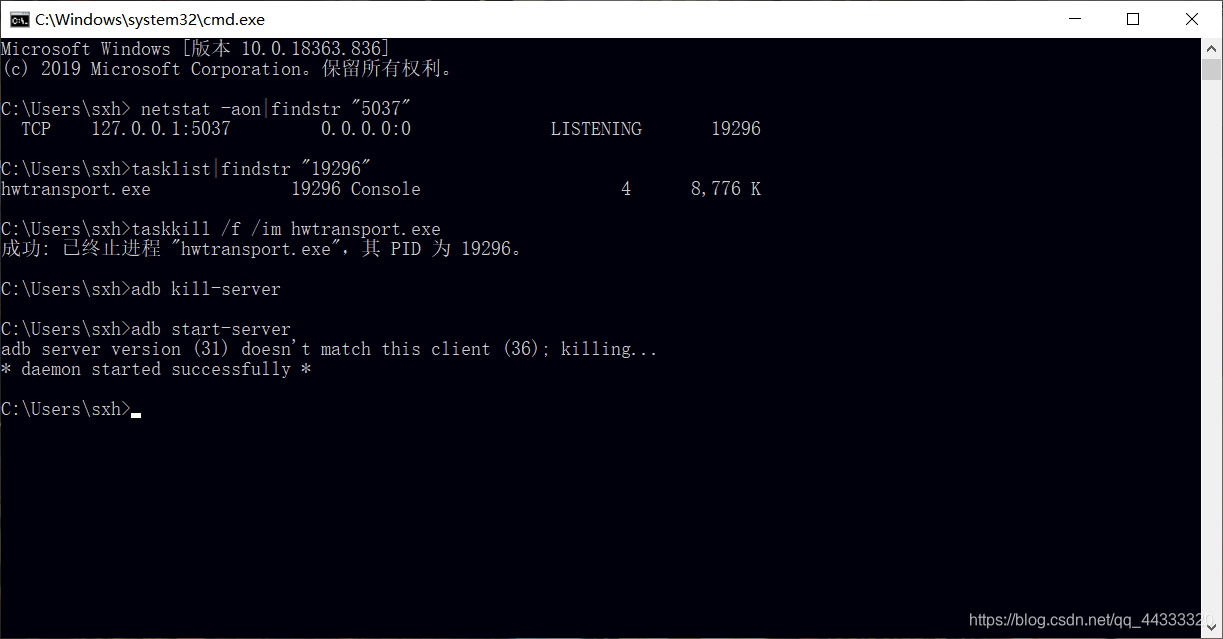
在运行时遇到问题描述: 运行android程序控制台输出 1、任务管理器 kill掉adb 或者重启adb server 2、查看任务管理器没有adb,猜测应该是某个程序占用了adb端口,接下来我列出详细步骤。 第一步: 打开cmd输入 netstat -aon|findstr “5037” (5037为adb默认端口 ) 这时候我们发现 19296占用了 5037端口。 第二步: 继续查看19296的task: 输入 tasklist|findstr “19296” 我们发现是hwtransport.exe占用。 第三步: 直接在任务管理器里面kill掉或 taskkill /f /im hwtransport.exe Tip: tasklist 可以找到任务管理器所有进程 taskkilll /f /im 程序名1.exe /f /im 程序名2.exe … 可以kill掉多个程序 重新开启adb (adb kill-server ,adb start-server) 附图: 希望对您有帮助!
The connection to adb is down, and a severe error has occured.问题解决
[2020-05-24 19:29:38 - NetMaster] The connection to adb is down, and a severe error has occured. [2020-05-24 19:29:38 - NetMaster] You must restart adb and Eclipse. [2020-05-24 19:29:38 - NetMaster] Please ensure that adb is correctly located at 'E:adt-bundle-windows-x86_64-20140702sdkplatform-toolsadb.exe' and can be executed. TCP 127.0.0.1:5037 0.0.0.0:0 LISTENING 19296 hwtransport.exe 19296 Console 4 8,776 K
本网页所有视频内容由 imoviebox边看边下-网页视频下载, iurlBox网页地址收藏管理器 下载并得到。
ImovieBox网页视频下载器 下载地址: ImovieBox网页视频下载器-最新版本下载
本文章由: imapbox邮箱云存储,邮箱网盘,ImageBox 图片批量下载器,网页图片批量下载专家,网页图片批量下载器,获取到文章图片,imoviebox网页视频批量下载器,下载视频内容,为您提供.
阅读和此文章类似的: 全球云计算
 官方软件产品操作指南 (170)


 21万+
21万+